
Find Us Our Location
- Plot no.1, Gali No.1, Gemini park, Nangli Sakrawati Najafgarh, New Delhi 110043
- [email protected]
- +91-9810765783

Walk onto any factory floor today and you'll notice the same thing — operators aren't flipping switches or reading dials anymore, they're tapping and swiping on an HMI screen. The Human Machine Interface has become the control point for almost everything: starting machines, adjusting parameters, monitoring alarms, and keeping an eye on production in real time. So when that screen freezes, goes blank, or stops responding to touch, it's not just an inconvenience — it can bring an entire process to a standstill.
The good news is that most HMI problems aren't as serious as they look. A blank screen doesn't always mean the unit is dead, and unresponsive touch doesn't always mean a full replacement is needed. In this blog, we'll go through the most common HMI screen problems, what usually causes them, and how professional repair solutions fix them — so you know what to check before assuming the worst. This is also why manufacturing units around Delhi NCR increasingly search for reliable HMI Repair in Bahadurgarh and HMI Repair in Sonipat whenever their control panels start acting up, rather than waiting for a complete breakdown, and why many of them turn to a trusted name like Advance Automation for a lasting fix.
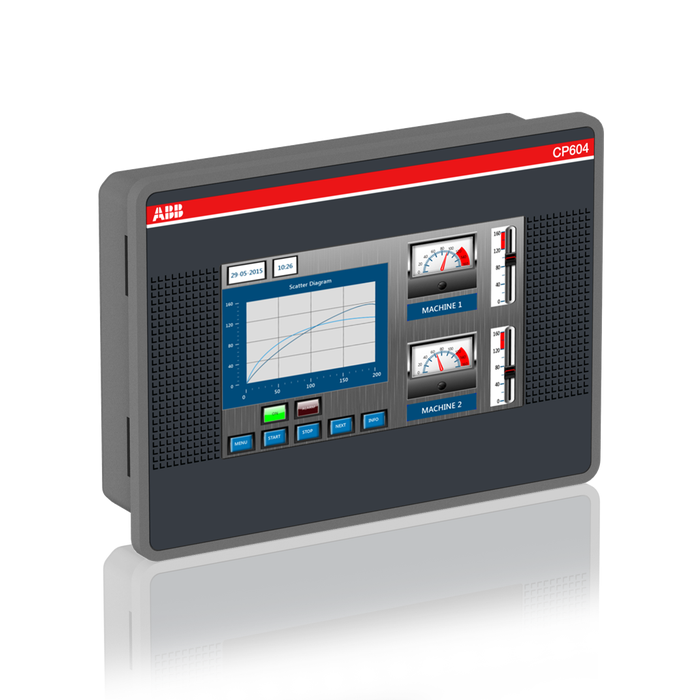
An HMI, or Human Machine Interface, is the touchscreen panel that lets operators communicate directly with PLCs, drives, and other automated equipment. Instead of dealing with rows of switches and indicator lights, operators simply look at the screen to see live data, alarms, and process status, and touch it to make adjustments.
Because it sits right at the point where human decisions meet machine control, any fault here has an immediate impact. A frozen HMI doesn't just mean losing a display — it often means losing the ability to control the machine altogether until the screen is either restarted or repaired.
Common HMI Screen Problems
1. Blank or Black Screen
This is probably the most alarming issue for any operator — the HMI simply shows nothing, even though the machine seems to be running. In many cases, people assume the entire unit is dead, but that's rarely true.
What usually causes it: A blank screen is often linked to a failed backlight, a loose display cable, a faulty power supply board, or in some cases, a corrupted firmware boot sequence that prevents the display from initializing properly.
How it's fixed: Technicians first check the power supply to confirm the unit is actually receiving voltage. If power is fine, the backlight and display cable connections are inspected next, since a loose ribbon cable is a surprisingly common culprit. If the issue is firmware-related, reflashing or reloading the boot files usually restores the display without needing to replace the panel.
2. Unresponsive or Inaccurate Touch
Sometimes the screen displays fine, but touch input either doesn't register at all, or the wrong area responds when you tap somewhere else entirely. This is incredibly frustrating for operators trying to control a live process.
What usually causes it: Touch panel wear, moisture ingress, dust buildup along the panel edges, or a misaligned touch calibration are the most frequent causes. Physical damage from repeated forceful tapping over the years can also degrade the touch sensor layer.
How it's fixed: A recalibration through the diagnostic menu solves minor accuracy issues. If the touch layer itself is degraded or damaged, it's replaced separately from the display panel, which keeps repair costs reasonable instead of requiring a full HMI replacement.
3. Flickering or Dim Display
A screen that flickers on and off, or appears unusually dim compared to when it was new, is a sign that something in the display's power or backlight circuit is struggling.
What usually causes it: Aging backlight components, a failing inverter board (in older CCFL-backlit units), or loose internal connections due to constant vibration on the factory floor are the usual suspects.
How it's fixed: The backlight or inverter component is tested and replaced if faulty. Internal connectors are also reseated and secured, since vibration-related loosening is extremely common in units mounted directly on moving machinery.
4. Communication Errors with PLC or Drive
Sometimes the HMI screen itself works perfectly fine, but it can't seem to "talk" to the PLC or drive it's supposed to control, showing a communication timeout or error message instead of live data.
What usually causes it: Damaged communication ports, faulty cabling, incorrect protocol settings, or a corrupted communication driver inside the HMI program can all interrupt this connection.
How it's fixed: Technicians test the physical connection first — cables, connectors, and termination — before moving on to checking communication settings and drivers within the HMI configuration. In most cases, this is resolved without needing to open up the unit at all.
5. Frozen or Slow-Responding Screen
An HMI that takes several seconds to respond to every touch, or freezes entirely and needs a restart to work again, usually points to an internal processing issue rather than a display problem.
What usually causes it: Memory overload from too many running processes, corrupted application files, or an aging internal battery affecting the real-time clock and memory retention are common reasons behind this kind of sluggish behaviour.
How it's fixed: Clearing unnecessary background processes, reloading the application program, and replacing the internal battery if needed usually resolves this. In more serious cases, a full firmware reset restores normal responsiveness.
6. Physical Screen Damage
Cracked glass, scratched touch surfaces, or impact damage from tools or equipment accidentally hitting the panel are common in busy production environments.
What usually causes it: Accidental impact, falling objects, or long-term wear in high-traffic areas near the panel.
How it's fixed: Depending on the severity, the glass or touch overlay can be replaced independently of the internal display and processing board, which is far more economical than replacing the entire HMI unit.
7. Power Supply Faults
An HMI that won't turn on at all, restarts randomly, or shows power fluctuation symptoms usually has an issue at the power input stage rather than the display itself.
What usually causes it: Voltage spikes, damaged power connectors, or blown internal fuses from unstable industrial power supply.
How it's fixed: The power input circuit is tested for voltage consistency, damaged fuses or capacitors are replaced, and in cases of repeated fluctuation damage, technicians often recommend adding a stabiliser or surge protector to prevent recurrence.
Why Repairing an HMI Usually Makes More Sense Than Replacing It
It's easy to assume that a malfunctioning HMI screen means it's time for a brand-new unit, but that's rarely the most practical choice. Most HMI faults are isolated to a specific component — the backlight, touch layer, power supply, or communication port — not the entire unit. Repairing at this component level offers several real advantages:
This is the approach followed for every unit that comes in — diagnose the actual fault first, and repair only what's genuinely damaged, rather than pushing for an unnecessary full replacement. If you're evaluating repair options, you can check the HMI Repairing Services page on Advance Automation's website for more details on how this diagnostic-first approach works in practice.
Preventive Tips to Avoid Future HMI Screen Problems
How Technicians Diagnose an HMI Fault Before Repairing It
Jumping straight to a repair without proper diagnosis often leads to fixing the wrong thing, or worse, missing a deeper issue that causes the same fault to return in a few weeks. A proper diagnostic process usually follows a logical sequence:
Step 1 — Power check. The very first thing checked is whether the unit is receiving stable input voltage. A surprising number of "dead screen" complaints turn out to be power supply issues rather than display failures.
Step 2 — Visual inspection. Technicians look for obvious signs of damage — cracked glass, burnt connectors, discoloured components, or moisture marks — which often point directly to the root cause.
Step 3 — Error code review. Most modern HMIs display diagnostic codes or log files that can be pulled up through a service menu. These codes narrow down whether the fault lies in the display, touch layer, communication module, or internal processor.
Step 4 — Communication test. If the screen works but the machine doesn't respond to inputs, the connection between the HMI and the PLC or drive is tested to rule out cabling or protocol issues.
Step 5 — Component-level testing. Once the general fault area is identified, individual components — backlight, touch sensor, power board, memory module — are tested in isolation to pinpoint the exact failure.
This structured approach is what separates a quick, lasting repair from a temporary fix that fails again within a few months. It also ensures that only the genuinely faulty part gets replaced, keeping the overall repair cost as low as possible.
HMI Faults Across Different Industries
The kind of HMI faults a factory experiences often depends heavily on its working environment. Understanding these patterns can help operators anticipate problems before they escalate.
In textile and packaging units, dust and lint accumulation is the biggest enemy, frequently causing touch inaccuracy and overheating-related shutdowns. In food and beverage plants, moisture and washdown exposure lead to a higher rate of power supply and connector corrosion issues. In heavy machinery and metal fabrication units, vibration is the dominant stress factor, loosening internal connectors and cables over time, which shows up as intermittent display flickering or communication drops. And in pharmaceutical and cleanroom environments, HMIs tend to fail less from environmental stress and more from continuous, round-the-clock usage, which accelerates wear on the touch layer and internal memory components.
Knowing which category your facility falls into can help you focus preventive maintenance efforts on the faults most likely to occur, rather than treating every HMI the same way regardless of its working conditions.
Local HMI Repair Support for Bahadurgarh and Sonipat Industries
Bahadurgarh and Sonipat are home to a large number of textile, packaging, and general machinery units, many of which run HMIs continuously across multiple shifts. In these belts, dust, temperature swings, and occasional power fluctuations tend to accelerate the exact faults covered above — flickering displays, touch inaccuracy, and power-related shutdowns.
For factories in these areas, having access to prompt HMI Repair in Bahadurgarh support means a malfunctioning panel doesn't sit idle for days waiting for a technician to travel down from Delhi. The same applies to units looking for dependable HMI Repair in Sonipat, where humidity and dust levels in certain manufacturing environments are known to speed up wear on touch panels and internal connectors. Choosing a service partner familiar with these regional conditions usually means faster diagnosis and a repair that actually lasts, which is why Advance Automation has built a strong presence across both these industrial belts.
Final Thoughts
A malfunctioning HMI screen can feel like a major setback, especially when it brings production to a halt without warning. But as we've seen, most of these problems — blank screens, unresponsive touch, flickering displays, communication errors, or physical damage — are fixable at the component level without needing a full replacement. Getting the fault diagnosed early, rather than waiting for it to worsen, almost always saves both time and money in the long run.
If your HMI screen is showing any of the symptoms covered above, it's worth getting it inspected before the issue grows into a bigger production problem. With the right diagnostic support from a team like Advance Automation, most of these faults can be resolved quickly and without unnecessary expense.
Frequently Asked Questions (FAQs)
1. Why does my HMI screen suddenly go blank even though the machine is running? A blank screen is usually caused by a backlight failure, a loose display cable, or a power supply issue — not necessarily a completely dead unit. Most of these can be diagnosed and repaired without replacing the entire HMI.
2. Can a cracked HMI touchscreen be repaired instead of replaced? Yes, in most cases the glass or touch overlay can be replaced separately from the internal display and processing board, which is far more cost-effective than replacing the whole unit.
3. Why is my HMI screen not responding to touch correctly? This is often due to touch panel wear, dust or moisture buildup, or a calibration issue. A recalibration or touch layer replacement usually resolves it.
4. What causes communication errors between an HMI and a PLC? Damaged cables, faulty communication ports, incorrect protocol settings, or corrupted drivers are the most common causes, and these are usually fixed without opening up the HMI unit itself.
5. How long does a typical HMI repair take? Most common HMI faults, such as backlight failure, touch issues, or communication errors, can usually be diagnosed and repaired within a few days, depending on the severity of the fault.
6. Is it better to repair an HMI or buy a new one? Repairing is usually the smarter choice since most faults are isolated to a single component. It costs significantly less, avoids reprogramming the application, and takes far less time than sourcing a replacement unit.
7. Can voltage fluctuations damage an HMI screen? Yes, unstable power supply is a common cause of power-related HMI faults, including random restarts and complete power failure. Using a voltage stabiliser can help prevent this kind of damage.
8. Do you provide HMI Repair in Bahadurgarh and HMI Repair in Sonipat? Yes, industries around these belts can get their HMI panels diagnosed and repaired locally, covering common faults like touch inaccuracy, blank screens, and power-related issues, without having to wait for a technician to travel from a distant city.
9. How can I get my HMI screen inspected and repaired? You can reach out through the Contact Us page on the Advance Automation website to schedule a diagnostic visit for your HMI or connected control systems.